

clean your digital junk drawer
a spring cleaning guide for your downloads folder


It’s April which means it’s officially The Season of the Perpetual Sneeze. The cherry blossoms have bloomed, the bees are frantic, the air is a thick yellow soup of pollen, and my sinuses are so awful I look like I’m cosplaying Rudolph the Red-Nose Reindeer.1
And yet, despite the itchy eyes, the primal urge to clean is kicking in. There is an undeniable need to throw open every window and scrub the baseboards until they shine like a new tooth. We are in the thick of the yearly spring cleaning where we all collectively decide that if we can just wash the winter out of our linens, we might finally be able to start over.
We tackle the closets. We sweep the dust from behind the fridge. And eventually, we hit the Junk Drawer.
Every home has one: The Museum of Indecision. It is the sacred place where an Allen wrench from a desk you bought in 2022 lives in tangled, metallic peace with a single, suspicious AA battery and a variety of sauce packets from different chain restaurants over the years2. It’s messy, it’s honest. You can touch it. You can organize it. You can, eventually, probably, see the bottom of it.
But while we’re busy scouring our kitchens and gutting our wardrobes, there is one space in our lives that remains stubbornly shuttered, dark, and increasingly heavy. I call it the digital junk drawer; others simply call it the ‘Downloads’ folder.
We all have one. While the world outside is blooming and renewing itself, our desktops are accumulating digital dead leaves. We are hoarding .dmg files for apps we already installed, Zoom links for meetings that happened three years ago, and screenshots of holiday gift ideas from November that we never actually bought. It is a junk drawer that never gets jammed. And because it never stops us from closing the drawer, we never stop to see what we’re actually carrying.
It feels like a betrayal to have a sparkling kitchen and a ‘Downloads’ folder that looks like a digital landfill.3 If we’re going to be ruthless with the physical clutter, we should be just as cold-blooded with our data.
Think of this as a manual for a digital4 spring cleaning. A way to stop hoarding our past intentions and make room for the present.

Step 1: The Archaeological Dig
Before you delete anything, you have to find the floor. Open the folder, sort by “Date Added,” and scroll all the way down until you hit the oldest, dustiest layer of your digital life.
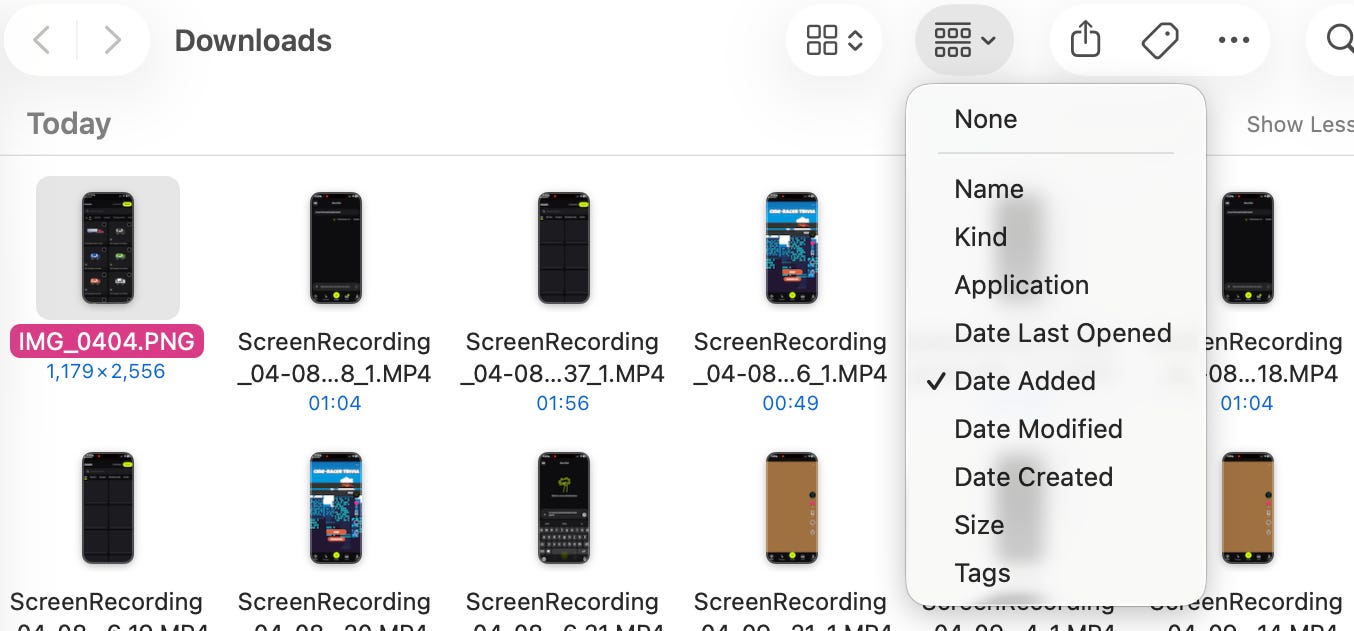
This is the Digital Carbon Dating phase. You are looking at the strata of your past intentions. You’ll find the fossils of who you were six months, a year, or three years ago:
A Spotify Wrapped screenshot from 20215.
A crochet pattern PDF for a project that is still, technically, in progress.
A 3:00 AM screenshot of a comment that was supposed to motivate you.
An Atomic Habits PDF. Bookmarked to page 12.
This is where the cleaning usually stalls. We struggle to hit “Move to Trash” because we treat these files like Potential Energy, as if a piece of our soul is stored in that 2MB file.
But carrying around the “Digital6 Fossil” of an old hobby or a past anxiety is just dead weight you forgot you were carrying. Hitting delete is an act of mercy. You are letting April actually be new.
Take a long look at the bottom layer. Acknowledge the version of you that needed those files, pour one out, then delete the folder.

Step 2: Inventory the Species
As you move back toward the present, you’ll start to see a pattern in the chaos. Recognizing these “species” of digital junk makes it easier to realize how little they actually offer.
The Exoskeletons (.dmg and .zip files): These are the installers left over after you’ve already set up the software. They are the empty eggshells left behind after you’ve already made the omelet. Don’t keep the shells in the carton. Throw them out!7 Unless the entire grid goes down8, you can always find these again.
The Aspiration Files: The “Intro to Ableton” PDF9 or the “Mastering Italian” ebook. We hoard these because they feel like a down payment on a better version of ourselves. In reality, they are usually just bookmarks for a curiosity that lasted for exactly one Tuesday in November.
The Anxiety Receipts: The screenshots of tracking numbers for packages that arrived months ago, or confirmation codes for appointments you’ve already attended. These were vital when you were panicked, but now they are just artifacts of a stress that has already passed. It just keeps that old anxiety on the desktop.
The “Maybe” Memes: Images you saved to send to a specific person but never did. Now, the context is gone, the joke is dated, and the moment has passed. They are the digital version of a “thinking of you” card that you forgot to mail and found six months later.

Step 3: The Mercy Killing
Now that you’ve identified the ghosts, it’s time for the actual purge. Forget the urge to “organize” these into neat, sub-divided folders; That’s just moving the dust from one corner of the room to another. We are looking for a clean break.
The 10-Second Rule: If you click a file and can’t remember why you saved it within ten seconds, it goes to the Trash. Your immediate confusion is a sign that the file has already lost its meaning. Trust your intuition over your hoarder instincts.
The Guilt Audit: This is for the “Aspiration Files.” If looking at a file makes you feel a tiny, nagging sense of “I really should have finished that,” delete it immediately. You are clearing space for things you actually want to do, rather than carrying around a graveyard of old obligations.10
The Time Capsule Hack: If the thought of hitting “Empty Trash” gives you actual heart palpitations, create one single folder named “Spring Purge 2026.” Drag everything into it. Move that folder to an external drive or a cloud service and delete the local copy from your computer. You’ve cleared your mental space and your hard drive without actually having to commit.

Once the folder is empty (or at least readable), take a second to listen to the silence. There is a gorgeous, artificial “crunch” asmr sound the computer makes when you finally empty the trash. A tiny, digital reward for the act of letting go.
In a season that is already demanding a better version of you, your digital junk drawer is the one place where you actually have total control. You can’t stop the cherry blossoms from exploding into pink glitter bombs outside, and you can’t stop the bees from their April commute, but you can stop your 2022 tax returns and old profile photos from cluttering up your present.
Open the digital windows. Let the 0kb breeze in. You’ll find it’s much easier to breathe…even if your sinuses are still convinced otherwise.
<3 brooklyn

so seasonally incorrect
so random but i saw a reddit thread the other day about someone finding an old mcdonalds orange holiday sauce in their grandma’s junk drawer kinda wild anyways
editing brooklyn here: omg i say digital so much in this one im so sorry but try to count how many times if you want a fun drinking game
SHOT
you’ve had the same top artist for 3 years in a row. you can delete this one
yall blacked out yet or what
i saw a note about this the other day … made me stop keeping them in the carton
at which point youll have bigger issues than re-installing slack
claim ✨
im big on the 4000 weeks stuff
your footnotes (is this the right word…?) had me giggling thank you for helping organize an otherwise impossible task for me <3
Why do you have to call me out like this 😩